With IRS automation reaching record levels in 2026, the traditional way of handling tax paperwork—manual sorting and data entry—has become a high-risk gamble. As the agency deploys more sophisticated AI to cross-check returns, even a single mismatched figure can trigger an audit or the $510 failure-to-file penalty. To navigate this increasingly automated landscape, many taxpayers are adopting CamScanner, an AI-driven tool that transforms raw paperwork into a structured, audit-ready digital archive.
In a traditional tax prep workflow, taxpayers often find themselves flipping between browser tabs, physical receipts, and various 1099 forms. This "tab-switching" fatigue is where most income calculation errors occur. Whether it’s misreporting Box 1 figures from multiple W-2s or overlooking a 1099 from a side gig, missing income sources creates immediate red flags for the IRS.
Modern AI document workflows change the foundation of this process. Instead of manual lookups, intelligent OCR (Optical Character Recognition) technology extracts key data points directly from tax forms. By shifting data handling from "human-operated" to "system-automated," you eliminate the manual transcription risks that trigger IRS Automated Underreporter (AUR) notices and CP2000 demands for additional tax.
Tax documents arrive from multiple directions: email attachments, physical mail, and digital downloads. Without a centralized system, it’s easy to overlook a crucial deduction or a minor interest income statement. IRS enforcement is tightening, and even simple mistakes—like social security number typos or incorrect filing statuses—can derail a return.
A professional digital workflow allows you to aggregate these scattered files into a single, structured environment. By using organized PDF folders, you can bundle related documents—such as all medical receipts for HSA claims or 1098-T tuition forms for education credits. This structured approach makes it simple to cross-reference every deduction against your final Form 1040, ensuring total consistency across the board.
The IRS generally requires taxpayers to keep records for at least three years, and with enforcement tightening, documentation accuracy is now a matter of financial self-defense. If your physical receipts are faded (especially thermal paper from gas stations or restaurants) or lost, you lose your primary defense in a potential audit.
This is where AI-powered image enhancement becomes a necessity. These tools ensure that every scan remains crisp and high-contrast, satisfying the required level of document clarity. High-quality scanning provides the necessary readability and helps keep records consistent over time.
However, simply taking photos and saving them in a phone gallery can create risks, as files may get buried among personal images, accidentally deleted, or become difficult to find when needed.
By storing documents in a structured system like CamScanner, users can keep files organized in dedicated folders, making important records easier to locate and reducing the risk of losing them.
The Role of Intelligent AI Assistants
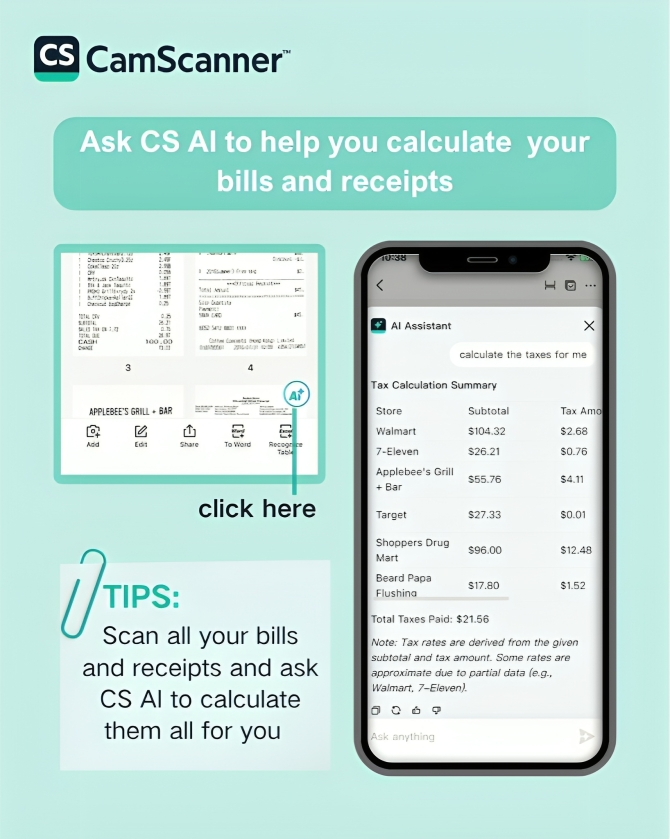
Beyond document processing, the next evolution of tax prep involves intelligent analysis. Advanced AI assistants can now help users interpret complex tax terminology, explain confusing form fields, or even assist in calculating totals from a batch of scanned documents. This capability bridges the gap between raw paperwork and accurate filing, acting as an intelligent shield against costly compliance mistakes.
As the tax code becomes increasingly complex, relying on old-fashioned manual methods is no longer a viable strategy. By integrating an AI document workflow like CamScanner into your financial routine, you can significantly reduce error risks while achieving a more streamlined, intelligent tax experience. In this environment, AI-powered document management isn’t just a tech luxury; it’s a necessary tool for long-term financial security.
1. How does an AI document workflow improve my tax filing accuracy?
By using OCR technology to extract data directly from your tax forms, an AI workflow eliminates the human errors associated with manual data entry, ensuring your reported figures match the records held by the IRS.
2. Is CamScanner better than just taking a standard photo of my receipts?
Yes. Standard photos often have shadows and distortion that may not meet IRS "clear document" standards. CamScanner uses AI to remove shadows and enhance text clarity, ensuring every scan is professional and audit-ready.
3. Can the CamScanner AI assistant really help with complex IRS terminology?
The AI assistant can provide plain-language explanations of confusing form fields and help calculate totals from your scanned documents, acting as a bridge between raw paperwork and accurate filing.