What Is a Mobile POS System and How Does It Work in a Restaurant?
Your server walks up to table six with a tablet. Takes the order. Taps send. Kitchen sees it on their screen thirty seconds later. No paper. No wait. No "did the ticket get lost?" The mobile POS isn't just a card reader on a phone—it's a complete rethinking of how orders move through a restaurant.
At its core, a mobile POS combines two things: hardware (tablets, handhelds, smartphones) and software that ties everything together. The hardware is the device your staff holds. The software is what runs on it—inventory tracking, payment processing, customer data, reporting. Both pieces matter equally. A great tablet with mediocre software is just an expensive paperweight. Solid software on an old device creates friction and delays.
How does the workflow actually happen? A server takes an order on the device at the table. The order syncs instantly to a kitchen display system. Payment gets processed right there—no walking to a terminal, no waiting for change. Data flows to your back office in real-time. You see sales, track inventory, spot trends. That's the foundation. mobile POS solutions go further, bundling inventory management, customer relationship tools, and advanced reporting into one ecosystem.
The catch: it only works if your network is solid and your staff actually uses it consistently.
Ten years ago, the standard flow was: server takes order on paper, walks to a fixed terminal, keys it in, walks back to the table. Repeat for payment. That's four trips minimum. Four opportunities for mistakes. Four chunks of time that add up during a dinner rush.
With mobile POS, the server never leaves the table. Order taken. Order sent. Payment processed. Receipt printed or emailed. One trip. One interaction. One chance to get it right.
What changes operationally? Your kitchen stops managing paper tickets. They see orders on a screen, color-coded by table and time sent. Expo knows exactly which dishes are for table three without reading chicken scratch. Errors drop. Table turnover speeds up. A restaurant that could turn four seatings in a night now handles five or six.
Payment speed matters just as much. A customer wants to leave. With traditional POS, the server walks to the back office, processes the card, walks back, walks back again if there's a problem. With mobile, the payment happens at the table. No second trip. No "we're having trouble with the system" apology. The customer leaves three minutes faster. Over a hundred covers a night, that's significant.
Efficiency isn't just about speed—it's about reducing errors and frustration. When servers key in orders on a mobile device with a clean interface, they make fewer mistakes. No illegible handwriting. No miscommunication between front and back. The data flows directly where it needs to go.
Customers feel the difference. They're not watching the server disappear to a terminal. They're not waiting ten minutes for change because the POS system is slow. They're not getting the wrong dish because a ticket got lost. Satisfaction scores rise. Tips improve. People come back.
Staff retention improves too. Servers hate outdated POS systems—they're slow, clunky, and make them look bad to customers. A modern mobile system feels responsive and professional. It reduces the frustration that comes from fighting with technology during a rush.
Modern mobile POS solutions don't just ring up sales. They're ecosystems. Inventory management—track what you have, set reorder points, get alerts when stock runs low. That alone prevents running out of a popular dish mid-service. Customer relationship management—capture guest preferences, track repeat visitors, build loyalty data. Reporting—sales by hour, by server, by dish, by daypart. Real-time dashboards show you what's happening right now, not yesterday.
Some systems include labor management—clock in and out, track hours, schedule staff. Others integrate with accounting software so your numbers flow straight to your bookkeeper. The best ones sync with reservation systems, so when a reservation arrives, the host can note it in the POS, and the server knows what to expect.
Check what you actually need versus what's nice-to-have. A small café might need just payments and basic inventory. A full-service restaurant with multiple locations needs integration across all locations, real-time visibility into costs, and robust reporting.
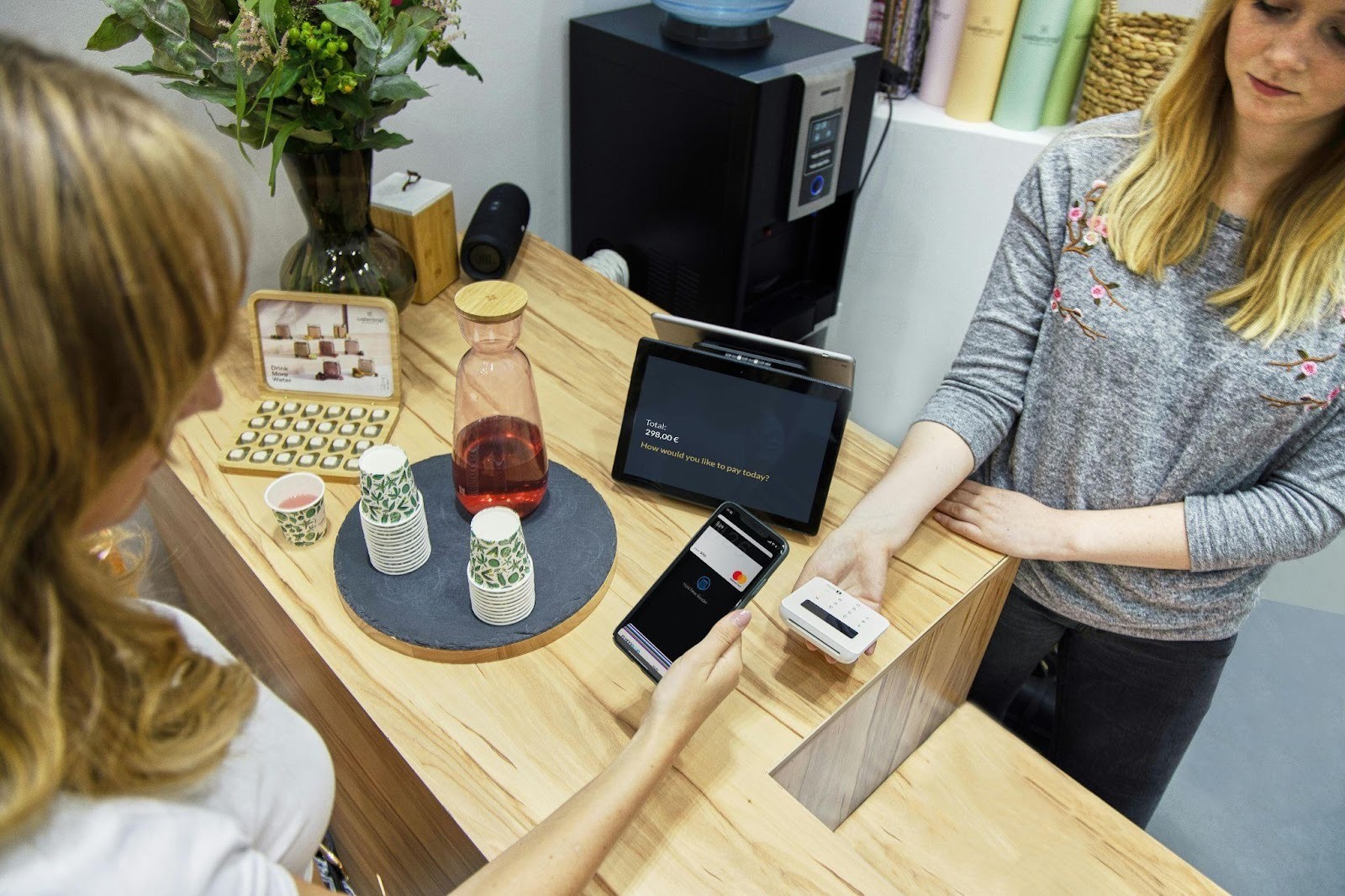
2026 isn't about cash or chip readers anymore. contactless payment options are standard now—tap a card, scan a QR code, use a mobile wallet. Customers expect it. They want it. The friction of inserting a chip card feels ancient.
What's the operational impact? Speed, first. A contactless transaction takes seconds. No PIN entry, no chip reader delay, no "removing card please" lag. During a rush, that matters. Second, security—tokenization means card data never actually touches your system. Third, flexibility—customers pay however they want, and your system handles it all.
QR code payments open a new flow: customer scans a code at the table with their phone, pays directly, no terminal needed. Some restaurants use it for takeout—customer orders online, scans at pickup, pays on their phone. One less interaction with staff.
The integration is seamless if your mobile POS supports it. If it doesn't, you're fumbling between two systems. That kills the benefit.
Cloud-based POS means your data lives on remote servers, not on one server in your back office. What does that actually give you? Remote access—log in from anywhere, check sales from home or from another restaurant location. Scalability—add a new location, and your system grows with you. No buying new hardware or managing separate databases. Automatic updates—the vendor pushes new features, security patches, and bug fixes without you doing anything. Your system is always current.
Downtime is the trade-off. If your internet goes down, most cloud systems are down. Some offer offline mode for limited functionality, but full operations require connectivity. That's why network reliability matters more with mobile POS than traditional systems.
Traditional POS systems are fixed terminals at a counter or kitchen. Mobile POS is on devices that move. Both have legitimate use cases. The comparison isn't about one being objectively better—it's about fit.
Lower capital expenditure is real. You don't need to wire the restaurant or install dedicated terminals. Flexibility matters—if you remodel or expand, you move tablets, not rip out terminals. Service improves because staff can interact with customers without disappearing. Upsells happen naturally when servers suggest items while standing at the table. Data is richer and more immediate, so decisions are faster. Scaling is easier; adding a location doesn't require new infrastructure, just new devices and licensing.
Network dependency is real. No Wi-Fi, no POS. Devices break or get stolen—tablets are more vulnerable than hardened terminals. Battery life means devices need charging, potentially during service. Security requires discipline—ensure devices are locked, data is encrypted, and old devices are wiped before resale. Staff training takes time because the interface is more complex than a traditional terminal. Integration hiccups happen; if your mobile POS doesn't talk cleanly to your accounting software, you're manually syncing data.
Ask yourself these questions before committing:
What's my budget? Both software licensing and hardware. A tablet runs $300 to $800. Software might be $50 to $200 per terminal per month. Multiply by locations and staff. Over three years, add it up.
What are my must-have features? Do you need inventory tracking, or is basic sales sufficient? Labor management? Loyalty programs? Reservation integration? Don't pay for features you won't use, but don't skimp on what you need.
Does it integrate with what I already have? Accounting software. Reservation system. Delivery platforms. If the mobile POS doesn't play nicely, you're managing multiple systems manually. That's wasteful and error-prone.
How good is the customer support? Call during a dinner rush with a problem, and you need someone who picks up. Check reviews. Talk to current customers.
What happens if the vendor goes under? Can you export your data? Switch systems without losing history? Get this in writing before signing.
Mobile POS isn't a trend anymore. It's the operating system restaurants run on in 2026. The question isn't whether to adopt it, but which system fits your operation and how fast you can train your team. Get it right, and you'll wonder how you ever managed without it.