3D printing has emerged as a global movement shaping industries, fueling creativity, and transforming education. From aerospace prototypes and medical devices to artistic sculptures, additive manufacturing is turning ideas into tangible objects.
When people search for “3D Printing Orca,” they are usually looking for one of two things:
- Orca Slicer – an advanced open-source slicer software designed to improve 3D printing.
- Orca whale models – 3D printed figures of the ocean’s iconic apex predator.
This comprehensive guide covers both. First, we’ll explore Orca Slicer software—its features, setup, and why it’s gaining popularity. Then we’ll dive into the creative and educational uses of printing orca models, including where to find designs, how to print them successfully, and how they’re applied in conservation and art.
Part 1: Orca in 3D Printing Software (Orca Slicer)
What is Orca Slicer?
Definition: Orca Slicer is a slicing software that converts 3D models (STL, OBJ, 3MF) into G-code, the language your printer understands.
Origins: It is a fork of Bambu Studio, which itself is based on PrusaSlicer. Orca combines the best features of both while adding new improvements.
Open Source: Being open source, Orca constantly evolves with updates, profiles, and contributions from its growing community.
In short, Orca Slicer isn’t a printer—it’s the brain of the printer, controlling every move for speed, accuracy, and quality.
Key Features of Orca Slicer
- Calibration Tools: Built-in tests for temperature, flow rate, and retraction deliver more accurate prints.
- Advanced Wall & Seam Control: Conceals layer seams and strengthens walls for cleaner surfaces.
- Multi-Plate & Multi-Object Slicing: Prepare and slice multiple objects or plates at once.
- Optimized Toolpaths: Reduces unnecessary movements, minimizing stringing and saving print time.
- Modern Interface: Easy to use, yet powerful for advanced users.
- Wide Printer Compatibility: Works with Prusa, Bambu, Creality, Ender, Klipper, and more.
- Remote Printing: Supports OctoPrint, Klipper, and PrusaLink for wireless/cloud workflows.
Orca vs Cura, PrusaSlicer, and Simplify3D
Feature | Orca Slicer | Cura
| PrusaSlicer | Simplify3D |
Open Source
| ✅ Yes | ✅ Yes | ✅ Yes
| ❌ No |
Built-In Calibration | ✅ Strong
| ❌ Limited | ⚠️ Some | ❌ No |
Multi-Plate Slicing | ✅ Yes | ❌ No | ❌ No | ❌ No |
Toolpath Optimization | ✅ Excellent | ⚠️ Good | ✅ Strong | ✅ Strong |
Interface | ✅ Modern | ⚠️ Basic | ⚠️ Technical | ⚠️ Outdated |
Printer Profiles | ✅ Broad | ✅ Extensive | ✅ Broad | ⚠️ Limited |
Verdict: Cura has the widest library of profiles, PrusaSlicer is precise, but Orca Slicer offers the best of both worlds plus unique features.
Quick Start with Orca Slicer
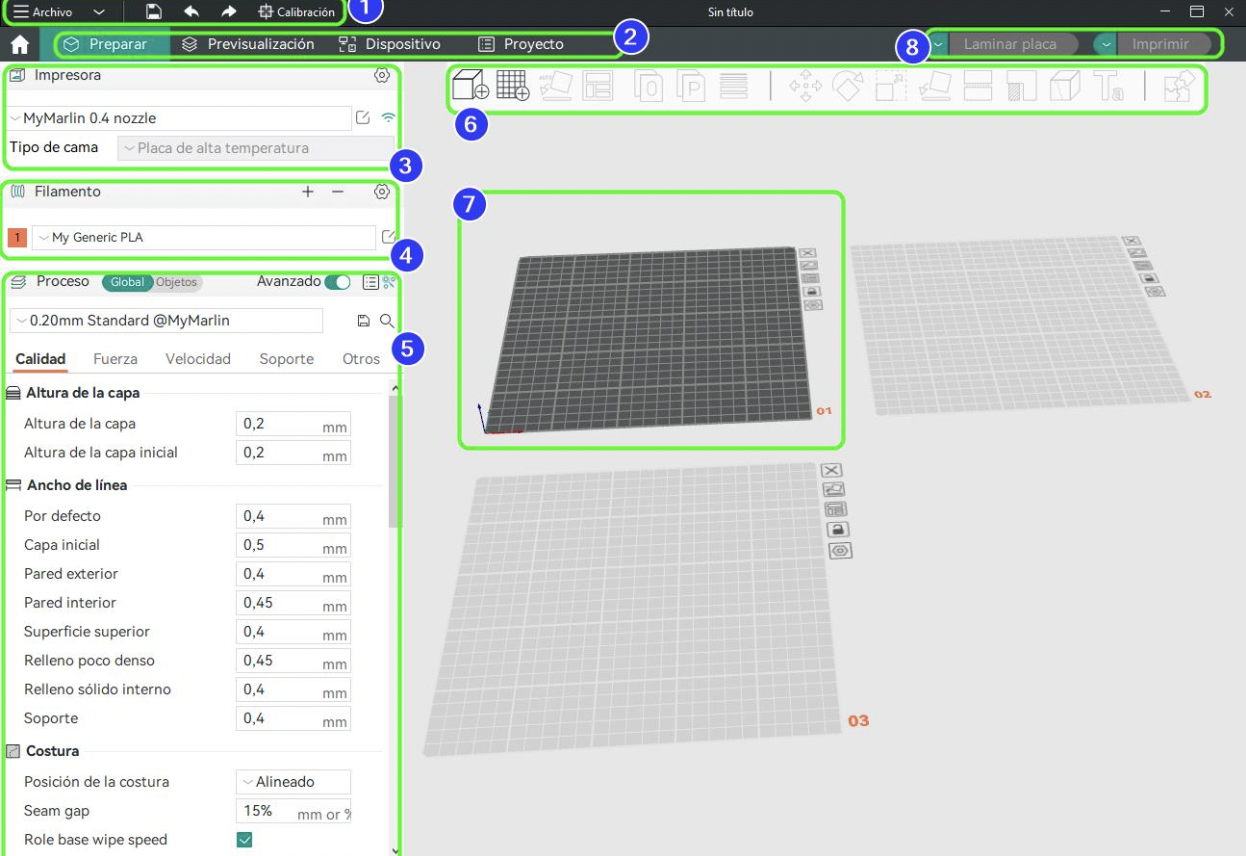
- Download Orca Slicer from orcaslicer3d.com
- Install on Windows, macOS, or Linux.
- Set Up Printer – choose a preset profile or create a custom one.
- Add Filament – configure PLA, PETG, ABS, TPU, etc.
- Import Models – drag and drop STL/OBJ files.
- Slice & Preview – check toolpaths, infill, and supports.
- Print – save to SD/USB or send wirelessly to your printer.
Pro Tips for Orca Slicer
- Use adaptive layers to balance speed and detail.
- Apply modifier meshes for specific print regions.
- Customize supports for easier removal.
- Enable coasting/wipe to reduce blobs and stringing.
- Run calibration tests whenever you switch filaments.
Challenges with Orca
- Steeper learning curve compared to Cura.
- Some printers require custom profiles.
- Occasional bugs with new releases.
- Support is community-driven (GitHub, forums).
Future of Orca Slicer
- AI-assisted slicing for automatic optimization.
- Cloud-based workflows for remote teams.
- Expanded filament support including carbon fiber and flexible composites.
- Adoption in professional industries such as aerospace and healthcare.
Part 2: 3D Printing Orca Models (Killer Whales)
While Orca Slicer powers 3D printing, many people search “3D Printing Orca” for orca whale models. 3D printing allows enthusiasts, educators, and conservationists to bring these magnificent marine mammals to life.
Why Print Orca Models?
- Education: Teachers use them in marine biology lessons.
- Conservation Awareness: NGOs showcase models in campaigns and exhibitions.
- Art: Artists create realistic or abstract sculptures.
- Hobby & Collecting: Enthusiasts build dioramas, pods, and custom orca figurines.
Finding Orca Models
- Free Sources: Thingiverse, Printables, MyMiniFactory.
- Premium Marketplaces: CGTrader, Cults3D, TurboSquid.
- Custom Design: Use Blender, ZBrush, or Tinkercad to model your own.
Printing Considerations
- Technology:
- FDM (PLA, PETG) – affordable and easy.
- SLA – extremely detailed and smooth.
- SLS – strong, no supports required.
- Scaling: Adjust size depending on purpose (classroom vs display).
- Orientation: Printing sideways often minimizes overhangs.
- Supports: Required for fins, tails, and underbellies.
Finishing Orca Prints
- Remove Supports carefully with pliers or cutters.
- Sand & Smooth to remove layer lines.
- Paint & Finish with acrylic paints for black/white patterns.
- Gloss Coat for a realistic wet-skin effect.
- Enhancements: resin water bases, acrylic eyes, LEDs, or articulated fins.
Common Printing Issues
- Warping: Use a heated bed, brims/rafts, and draft-free space.
- Support scarring: Use tree supports or lower density.
- Fragile fins: Print in PETG/ABS or increase wall thickness.
- Loss of detail: Lower layer height (0.1–0.15mm) and slow speed.
Environmental Considerations
- Use PLA or recycled filament.
- Recycle failed prints.
- Support eco-friendly brands producing ocean-plastic filaments.
SEO-Friendly FAQs
Q1: What does 3D Printing Orca mean?
It refers to both Orca Slicer software and orca whale 3D models.
Q2: Is Orca Slicer better than Cura?
Orca has advanced calibration tools and optimized toolpaths, while Cura has a broader library of printer profiles.
Q3: Can Orca Slicer work with all 3D printers?
Yes, but some printers require custom profiles.
Q4: Where can I download 3D printable orca models?
Free and premium designs are available on Thingiverse, Printables, CGTrader, and Cults3D.
Q5: How do I make orca 3D prints realistic?
Print at fine layer heights, use quality paints for natural black/white patterns, and apply a gloss finish.
Conclusion
The keyword 3D Printing Orca brings together two worlds:
- Orca Slicer software – a modern, open-source slicer that helps users achieve better print quality and more efficient workflows.
- Orca whale models – 3D printed creations that serve education, conservation, art, and personal enjoyment.
Whether you are a maker seeking advanced control with Orca Slicer or a hobbyist printing lifelike whales, 3D printing Orca showcases the limitless possibilities of additive manufacturing.








