With the popularity of HD/4K monitors, DVD upscaling is becoming increasingly important. Common DVD resolutions, such as 480p for NTSC and 576p for PAL, may lead to problems such as blurring, pixelation and loss of details when the DVDs are played directly on a high-resolution screen. You may know some common and basic DVD upscaling methods, such as the nearest neighbors and bicubic interpolation by standard DVD players and TVs. These traditional methods, however, cannot effectively improve image quality. With the booming of AI technology, you can upscale DVD to 1080P with the advanced AI tools. The deep learning algorithms can analyze image features and generate higher resolution images, thus bringing users a better DVD viewing experience on modern high-resolution screens. In this article, we will explain some common definitions of DVD and share different methods to upscale DVD to 1080P effectively. Read it through now.
Part 1: What is DVD Upscaling?
What resolution is DVD? What does upscaling mean? DVD Upscaling is used to increase the original resolution of DVD videos (NTSC 480p, PAL 576p). In the era of high-definition and 4K monitors, the original resolution of DVDs is much lower than the screen resolution. Direct playback will result in blurry images, loss of details, and poor viewing experience. Upscaling can make the image better fit the screen and improve clarity.
Traditionally, the nearest neighbor increases the resolution by simply copying pixels. In this way, however, the image will have obvious jagged edges, pixelation and other defects. Another popular method is bilinear/bicubic interpolation. It estimates new pixels by calculating the surrounding pixel values. Although it is more complex than the former method, its performance can be improved in processing details and edges as it can easily cause the image to stretch, blur, and produce artifacts.
Leawo Blu-ray Ripper is rated as the best Blu-ray ripper. It delivers great performance when ripping Blu-ray to MP4 or MKV in 1080P. Therefore, it can also serve as a great DVD upscaling software. Apart from that, it can remove ads automatically and retain selected subtitles in different languages. The conversion process is faster than other tools.
Here is how you can upscale DVD to 1080P. You need to download and install the program on your computer first.
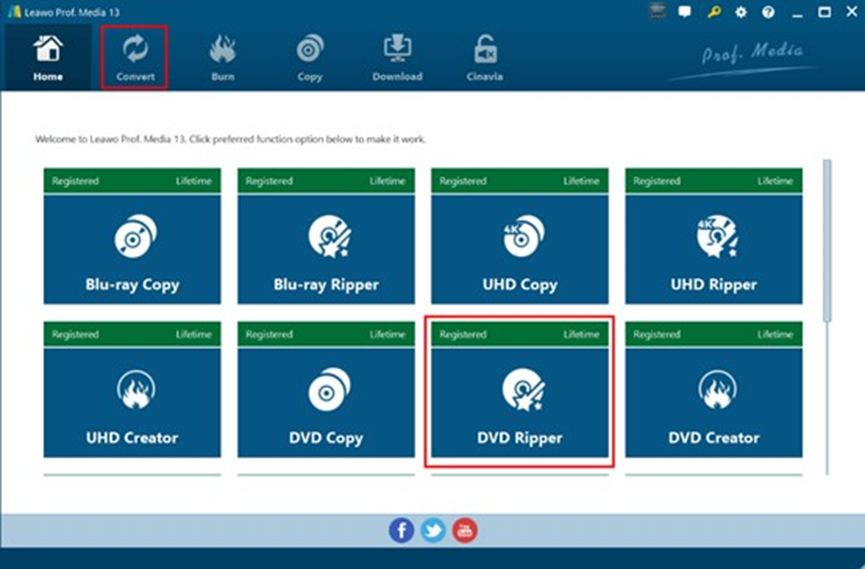
Step 1: Select DVD Ripper in Leawo
Kick start Leawo Blu-ray Ripper and select the DVD Ripper module.
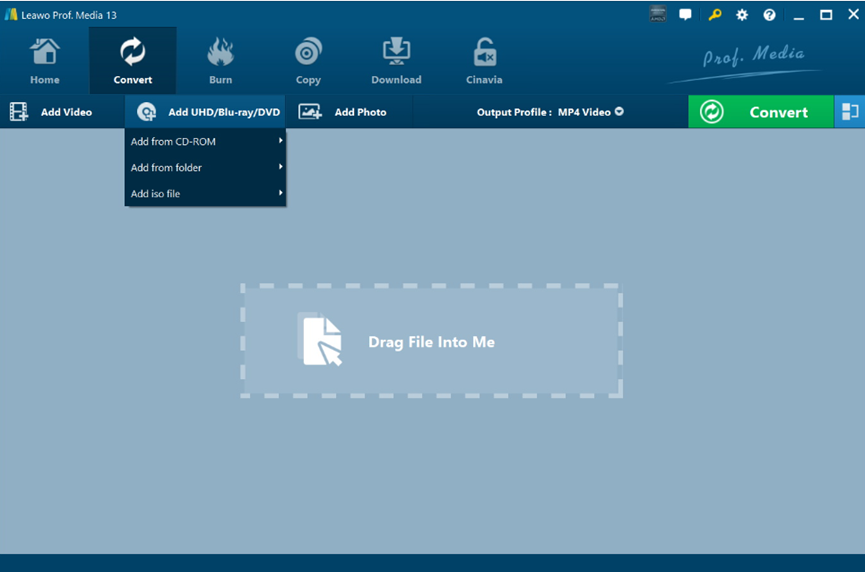
Step 2. Import Source Blu-ray Files
Under “Convert”, choose "Add UHD/Blu-ray/DVD" in the drop-down box. Then you can import the target DVD files into the program.
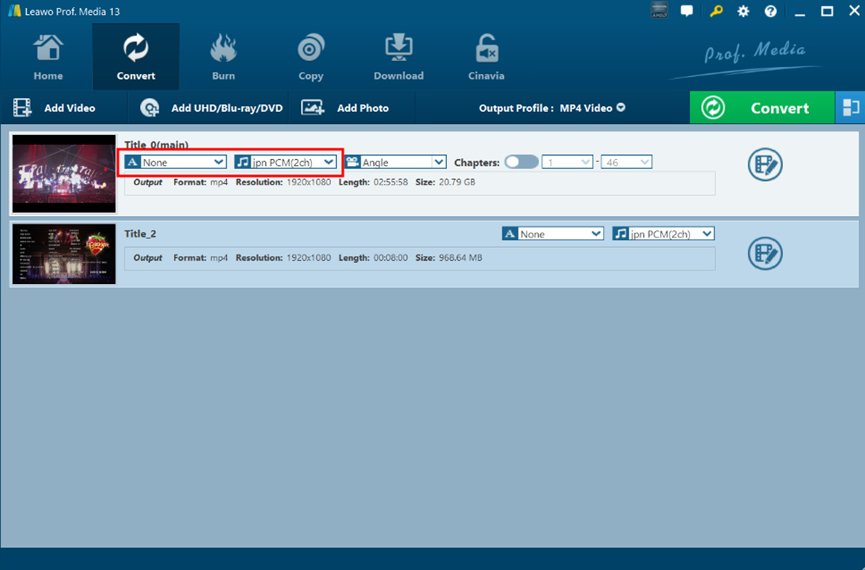
You can view the imported Blu-ray videos here. If there are multiple chapters and different angles, you can choose the ones based on your needs.
Step 3: Output profile setting
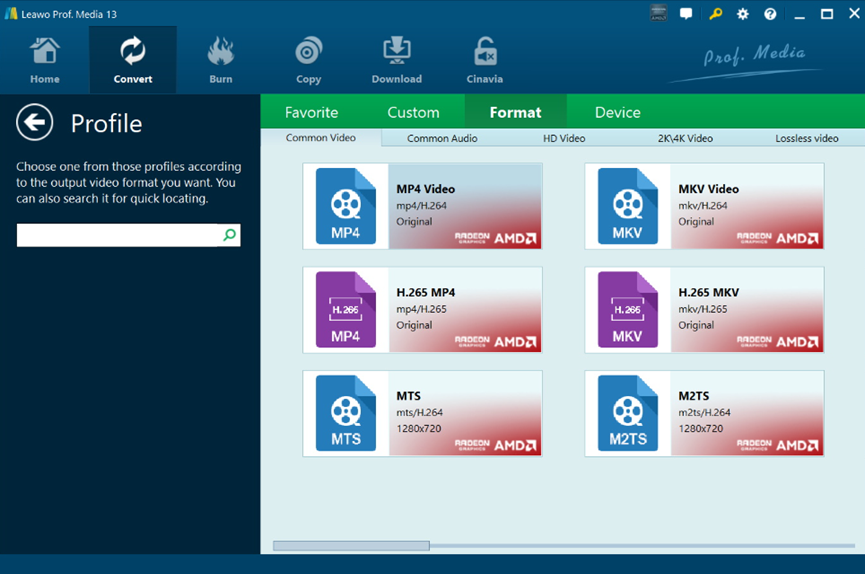
In the drop-down box of “MP4 Video”, hit “Change” to open the “Profile” panel. Hit “Format” to choose “MP4” as the output format on the right.
Step 4: Output directory setting
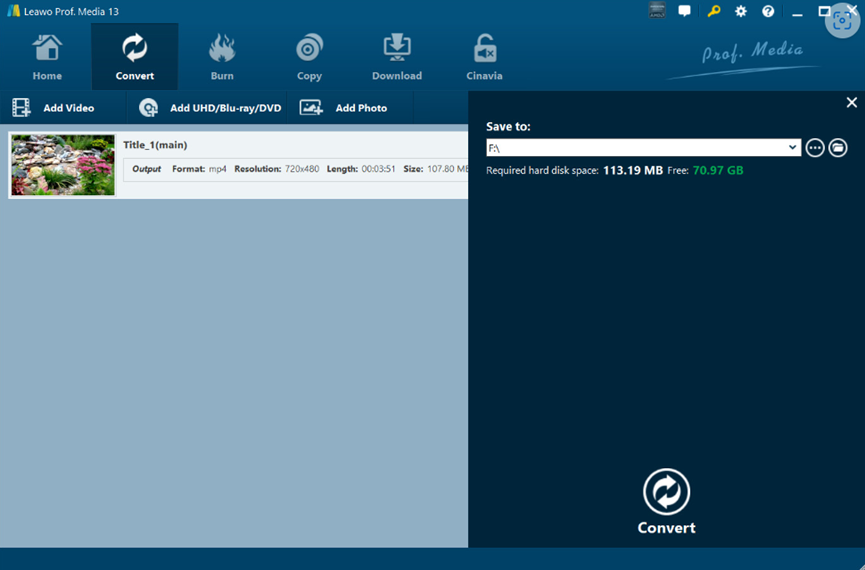
Hit “Convert” again and select a folder to save your output videos.
Step 5: Start the conversion process
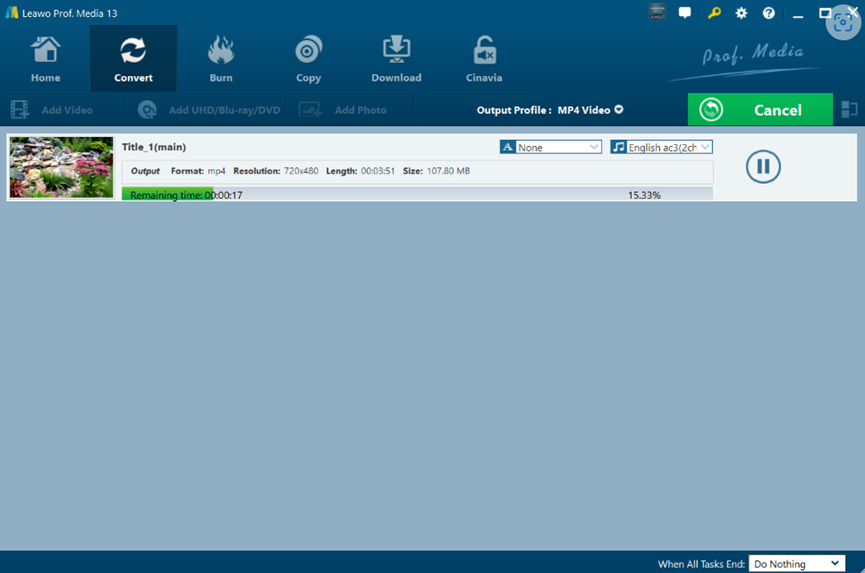
Press the "Convert" button to initiate your conversion process.
There you go. Leawo Blu-ray Ripper successfully upscales your DVD to 1080P and saves them in more common video formats.
Topaz Video AI is a professional video enhancement tool developed by Topaz Labs. It uses AI and deep learning algorithms to analyze video content. It does a great job of improving video resolution and repairing blur and noise. Plus, it can convert low-resolution videos to HD or even 8K resolution. It is suitable for DVD content, home videos, stock footage and other video types, providing users with high-quality video processing effects.
Here is how to upscale DVD with Topaz Video AI.
Step 1. Download and install Topaz Video AI software. It offers a 30-day free trial and is available on the official website.
Step 2. Open the software and import the video by clicking the "Browse" button. You can also directly drag the DVD video file into the software interface. The software supports many common video formats such as MP4, AVI, MOV, etc.
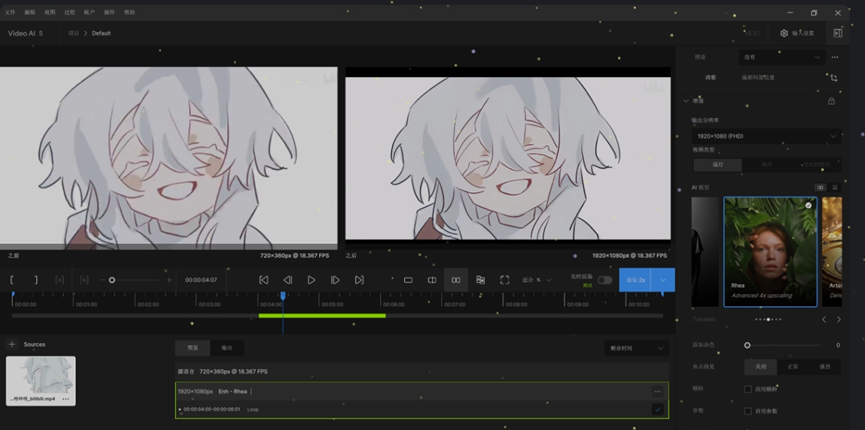
Step 3. In Settings, select “1080P” as the target resolution. You can also adjust some detailed settings, such as the sharpness and denoising strength to improve the original quality of the video.
Step 4. After the processing is completed, click the "Render" button to render for a specified duration and preview the effect.
While AI upscaling is powerful, some people expect real-time upscaling effects. Well, in this part, we will introduce a few hardware players. It should be noted that these tools can run in real time, but the costs are not low.
Panasonic DP-UB420 Streaming 4K Blu-ray Player ($249.99)
Panasonic DP-UB420 is an all-in-one player that integrates 4K UHD Blu-ray playback, DVD playback, CD playback, and 3D Blu-ray playback. Multiple audio and video formats, such as WAV, WMA, AAC, AIFF, as well as DVD-R, DVD+RW, DVD-RW are supported. The player can directly upscale Full HD chroma and luminance signals to 4K signals, integrating 4K image color signals (4:2:0) into 4K (4:4:4) through multi-tap chroma processing to create images with natural texture and rich depth.
Sony BDP-S6700 Streaming 4K Upscaling Blu-ray Player ($107.99)
Sony BDP-S6700 is a Blu-ray player with a 4K upscaling feature. It can play Blu-ray, DVD and other discs. Sony's Precision Cinema HD Upscale technology can analyze the picture content of DVD videos and improve resolution, thereby improving the standard DVD quality to HD, allowing users to have a better visual experience when watching DVDs.
Sony DVPSR510H DVD Player ($74.87)
Sony DVP-SR510H is a DVD player launched by Sony. It supports multiple media playback and is suitable for home theater. It uses the Precision Cinema HD upscale technology similar to other Sony players. This technology analyzes and processes DVD video signals through special chips and algorithms to improve the resolution, sharpness and color performance of the picture. For example, it may optimize the edges of the image to make the lines clearer and enhance the layering of the picture. Also, it can correct and enhance the color to create a more vivid and natural color. Therefore, the DVD quality is improved to bring you a better visual experience.
1. Can upscaled DVDs match Blu-ray quality?
Not really. Even if the DVD image quality is upscaled to 1080P, its original pixel number and information are limited and cannot be compared with native 1080p or higher resolution Blu-ray videos. There will be a significant gap in picture details, clarity and sharpness. Also, Blu-ray Discs have a higher average bit rate, providing richer image details and smoother video playback.
2. Should I upscale DVDs to 4K?
It depends on your requirements. For example, if you have a 4K TV or higher resolution display device, you can gain a clearer picture with more details by upscaling DVDs to 4K quality. But it should be noted that the cost to upscale DVD to 4K is not low. You need to purchase a player or related equipment that supports 4K upscaling, which costs a certain amount of money. Refer to the recommended hardware players in Part 2.
3. How long does AI upscaling take?
It depends on different factors, such as the graphics card performance. Also, the length, original resolution, and frame rate of the video will affect the upscaling efficiency.
4. What about audio quality?
You can also enhance DVD’s audio quality. When playing DVDs on a computer, you can use Blu-ray Ripper to optimize them. You can find extensive audio adjustment functions when choosing the output format.
In this post, we shared some basic definitions of DVD resolution and upscaling and how to upscale DVD to 1080P. If you want to achieve advanced and fancy effects, you can turn to AI tools such as Topaz Video AI or hardware players. Leawo Blu-ray Ripper is the most recommended tool to rip DVD in high-definition videos. The operation is easy and user-friendly. Give it a try now to transform your DVD in 1080P.