
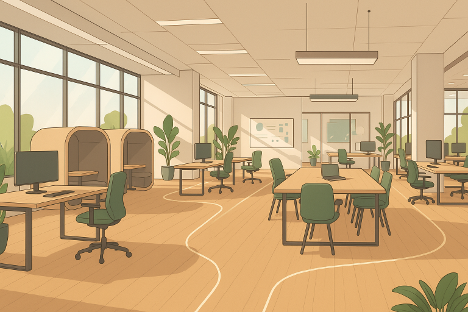
A well-designed workspace isn't just about looking good; it directly shapes how people work and how easily they access tools and ideas throughout the day. Whether it's on a corporate floor or in a home office, the layout choices we make today can either smooth out tasks or slow everything down.
Poor design creates friction, leading to lost time and increased frustration. Smart design, on the other hand, removes it, fostering environments where focus, collaboration, and efficiency thrive. For businesses, workspace design is one of the most overlooked drivers of daily performance, with studies suggesting that optimized environments can significantly boost productivity and employee well-being.
The way people move through a space influences their daily routines. A workspace that allows natural flow sets the tone for a more productive day. This means an office without awkward corners or obstacles, where the layout encourages casual interaction without disrupting focused work.
Zones are a useful strategy here. Break the office into areas that match tasks:
This setup minimizes distractions, making movement feel natural instead of forced. Teams who frequently shift from one task to another benefit immensely from height-adjustable desks. Additionally, mobile furniture makes it easier to reconfigure spaces without stopping the flow of work, adapting to evolving project needs.
Beyond aesthetics, natural light has a profound effect on mood and attention. Desks positioned near windows can help reset mental focus throughout the day, combating fatigue. Too much glare, however, can cause screen strain. Using sheer blinds or positioning screens perpendicular to windows helps balance it out, ensuring comfort and sustained attention.
Air quality also plays a crucial role in cognitive function. CO2 buildup affects concentration, making proper HVAC systems a must in offices. Adding indoor plants can further improve air quality and add a touch of natural calm. In environments where natural ventilation isn't available, investing in air purifiers is a wise decision, especially in urban areas, as improved air quality has been linked to better decision-making and reduced sick days.
The right setup can remove a surprising amount of physical stress, allowing people to stay focused longer and reduce absenteeism due to discomfort. Proper ergonomics are a worthwhile investment, often leading to long-term savings in healthcare costs and increased output.
Look for furniture with these features:
Many teams are discovering the benefits of modular ergonomic solutions, often guided by experts at a trusted office furniture store in Los Angeles or similar local providers. These solutions allow workstations to be fine-tuned for each employee without replacing entire desks, offering a cost-effective and flexible approach to employee comfort.
Clutter is a significant distraction, increasing visual noise and making it harder to think clearly. Smart storage removes this friction.
Keep your daily tools easily accessible but hidden. Use drawer organizers or vertical wall racks to store them within arm's reach while freeing up the main workspace. Shared areas can make use of labeled storage zones to cut down time spent searching for supplies, fostering efficiency and reducing frustration.
When designing storage systems, think in layers:
This layered approach keeps the desk surface clean without hiding things too far away, promoting a sense of calm and clarity.
A modern workspace includes more than just a laptop and a mouse; peripherals and mobile devices all need homes. Seamlessly integrated technology leads to a smoother workflow.
Cable management is an excellent starting point. Use trays, channels, and power strips mounted underneath to eliminate the visual distraction of tangled cords. Grommets and desk-mounted ports help organize the surface, ensuring a tidy and efficient workspace.
Wireless peripherals also make a difference. Fewer cables mean less clutter, enhancing the clean aesthetic. When devices need charging, having a central dock or power station that blends into the desk design keeps everything charged without chaos.
Conference rooms benefit significantly from this approach. Modern setups often use tables with built-in ports and cable channels to keep things clean and reduce valuable setup time before meetings, ensuring a professional and efficient environment.
Work needs to change throughout the day, and a rigid space makes it harder to adapt. Modular furniture solves this by letting teams reconfigure layouts quickly without needing professional assistance.
Lightweight tables, rolling whiteboards, stackable chairs, and folding desks allow different group sizes to make quick changes to the work area. A space used for focused work in the morning can easily transform into a workshop zone by lunch.
Hybrid teams, in particular, benefit from spaces that can shift fluidly between individual productivity and group sync-ups. Even acoustic panels and lighting can be repositioned in newer setups, helping turn static offices into dynamic, responsive spaces that support diverse work styles.
Even well-meaning upgrades can miss the mark, creating new forms of friction. A few common mistakes that slow down the benefits of good workspace design include:
Small mistakes like these can create long-term friction, making it crucial to identify and fix them early.
In dynamic workspaces, high-performing teams consider design an integral part of the work process. They don’t wait until problems arise. Instead, the environment is proactively set up to support productive habits, reduce distractions, and promote quick wins.
Some teams assign a workspace coordinator who checks layouts, ergonomics, and lighting quarterly. Others build feedback systems where employees can suggest layout tweaks or highlight friction points in real-time, fostering a culture of continuous improvement.
Tech-driven teams often run standard setups across all workstations. Pre-mounted accessories, labeled wires, and clean desktops help every employee walk in and start working without delay. What sets these teams apart isn’t just the furniture; it’s the keen attention to how space affects behavior. They design for movement, comfort, clarity, and choice, understanding that these elements directly impact output and employee satisfaction.
A smarter workspace stems from thoughtful placement and the strategic use of flexible tools. It creates an environment that supports how people actually work, not just how they're expected to. Every piece of office furniture plays a role in making that possible. Once a workspace stops working against the people using it, productivity tends to follow naturally. Clean movement, smooth tech integration, less visual noise, and a focus on well-being lead to faster, more efficient work and fewer headaches. By continuously evaluating and refining their workspaces, teams can unlock their full potential and foster an environment where innovation thrives.







