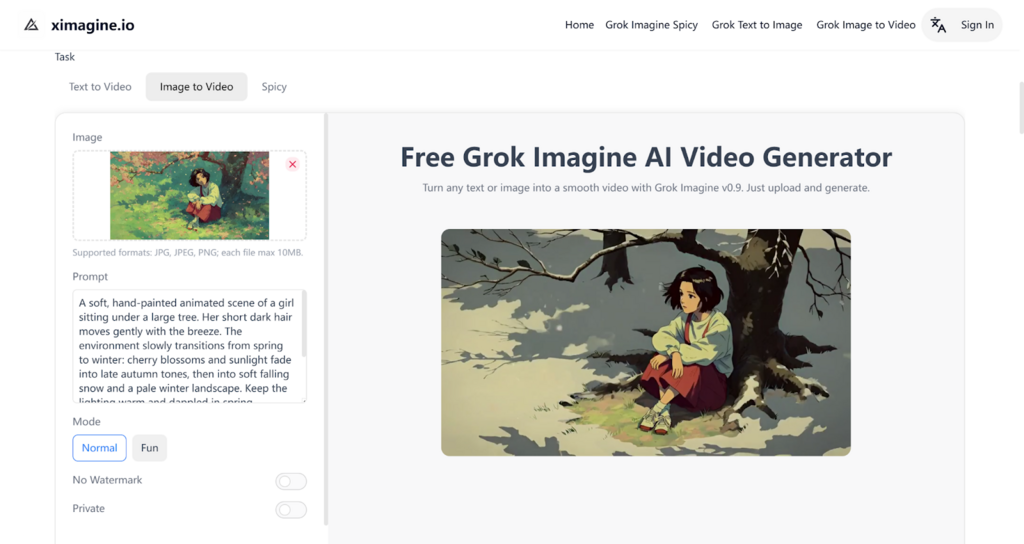
As video content continues to dominate online communication, having the ability to create engaging videos quickly and easily has become essential. For those who want to create professional-looking videos without the need for complex editing software, Grok Imagine on XImagine.io offers a powerful solution. This AI-powered video generator allows users to transform text and images into high-quality videos with minimal effort.
Whether you're looking to create content for social media, marketing campaigns, or personal projects, Grok Imagine simplifies the process by providing an intuitive, free tool that makes video creation accessible to everyone. In this guide, we’ll walk you through how to get started with Grok Imagine and how to harness its features to create stunning videos in just a few steps.
Developed by Elon Musk’s xAI company, Grok Imagine AI video generator takes the capabilities of the original Grok model to a whole new level by enabling users to convert text into dynamic video content. As one of the most advanced tools in the AI video generation space, Grok Imagine combines the power of natural language processing with cutting-edge image generation to produce stunning videos from simple text prompts or images.
Building on the success of its predecessor, Grok Imagine enhances the functionality by not only creating high-quality visuals but also integrating seamless video transitions and effects. Whether you're an artist, marketer, or content creator, Grok Imagine opens up a world of possibilities for generating engaging video content with minimal effort.
One of the standout features of Grok Imagine is its incredibly fast video generation. The AI Video Generator is designed to turn text or images into high-quality videos within minutes. Whether you're converting a simple text prompt into a dynamic video or animating an image, Grok Imagine provides a streamlined process that reduces the time spent on video creation, making it an ideal tool for marketers, content creators, and anyone needing to generate videos quickly.
Grok Imagine excels in delivering ultra-realistic video output with its advanced rendering capabilities. The AI model produces fluid motion and 3D animations that ensure smooth transitions and a cinematic look. It also supports 360° camera angles, enabling users to create immersive video experiences. Whether you’re looking for emotional close-ups or detailed motion effects, Grok Imagine ensures that each video has a high level of visual quality and realism, making it perfect for storytelling, marketing, and other creative applications.
For video content, syncing visuals with sound is essential. Grok Imagine makes this process effortless by automatically syncing audio tracks with generated video content. Whether you're adding background music, voiceovers, or sound effects, Grok Imagine ensures that the sound aligns perfectly with the visuals, providing a seamless and professional viewing experience. This feature saves users time and effort, eliminating the need for manual adjustments and improving workflow efficiency.
Grok Imagine offers a variety of creative modes, allowing users to choose the video style that best fits their needs. Whether you prefer Normal Mode for standard video creation, Fun Mode for playful, lighthearted visuals, or Spicy Model for bolder, more energetic animations, the platform provides flexibility for different creative directions. These modes enable users to fine-tune the mood and tone of their videos, offering greater control over the final result and helping to create unique content tailored to specific projects.
To begin, go to XImagine.io and create an account. Registration gives you access to the Grok Imagine AI video generator and allows you to start exploring its core features right away. While some advanced options may require a subscription, the free account lets you test the platform and generate videos without any complicated setup. Once you're logged in, you can begin turning your ideas into animated content with ease.
Next, upload a text prompt or an image that you want to transform into a video. If you're using text, describe the video you wish to create, and if you're using an image, simply upload your artwork or photo. Grok Imagine will process these inputs to generate a visually engaging video, tailored to your specifications. The process takes just a few minutes, depending on the complexity of your content.
Once your text or image is uploaded, click the “Generate” button, and Grok Imagine will begin creating your video. In just a few minutes, you’ll be able to preview your AI-generated video. If you're satisfied with the result, you can easily download and share the video across various platforms. This seamless process ensures you can produce high-quality content quickly, whether for personal or professional use.
When using Grok Imagine to generate videos from text, clarity and detail in your prompts are key. The more specific you are with your descriptions, the better the AI can create a video that matches your vision. Whether you're generating a short animation or a more complex scene, providing a detailed text prompt will result in a more accurate and polished final video.
If you're uploading an image to create a video, ensure it’s of high quality. High-resolution images allow Grok Imagine to produce smoother animations with sharper details. This is especially important if you want to animate intricate artwork or professional photos. Low-quality images may result in a less polished video output.
Grok Imagine offers various video modes such as Normal Mode, Fun Mode, and Grok Imagine Spicy Model. Depending on the tone or style of video you want to create, experimenting with these different modes can help you achieve the right visual effects. Spicy Model , for example, adds bolder colors and effects, while Fun Mode might create lighter, more playful animations.
XImagine.io offers Grok Imagine free to give users the chance to explore its features before committing to a paid plan. Use the free version to experiment with different video types and settings. This is a great way to familiarize yourself with the platform and understand how it works, helping you get the most out of the paid features later.
Grok Imagine on XImagine.io provides an accessible, AI solution for anyone looking to create high-quality videos quickly and efficiently. Whether you’re generating content from a text prompt or transforming images into animated videos, Grok Imagine simplifies the entire process. The platform’s flexibility, multiple creative modes like Spicy Model , and automatic audio syncing make it a powerful tool for content creators, marketers, and educators alike. With a free version available on XImagine.io, it's easier than ever to dive into video creation and produce professional results in minutes.